
Pandido Casino Login: Sign In and Registration Guide
If you want to jump into slots, live tables or sports betting at Pandido Casino, you’ll first need a smooth login and registration flow that does not get in the way of the fun. We’ve made sure you can register at Pandido Casino, log in and recover access in just a few clicks, both on desktop and mobile.
Pandido Login and Registration Overview
You can access Pandido Casino directly from the main page using the Log in and Register buttons in the header, so you are always one click away from your account. You only need a valid email, a secure password and a quick confirmation that you are old enough and allowed to play from your country.
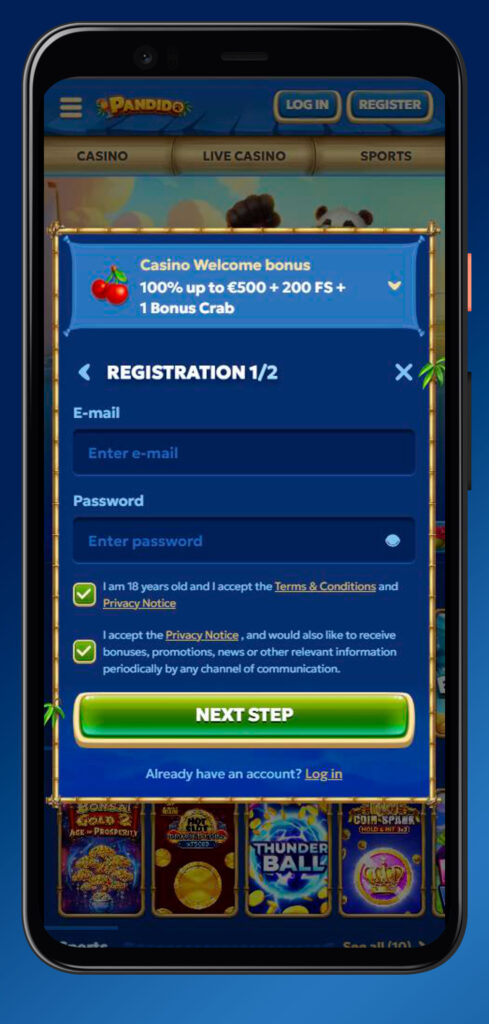
You must register your account in your own real name, keep your Pandido Casino login data secret and never share it with anyone, since all activity under your email and password is treated as yours. On top of that, you are allowed only one account per person, address, phone, email and IP, so if you try to create duplicates, we can close them and void promos or winnings linked to them.
| Action | Where to click | What you need | Time to complete |
| Register | “Register” in the Pandido Casino header | Email, password, data | About 2–3 min |
| Log in | “Log in” in the header | Email, password | A few seconds |
| Password reset | “Forgot your password” | Email access | 1–5 minutes |
Bottom line, once you create your Pandido Casino profile, logging in becomes a matter of seconds, and you can move straight to deposits, bonuses and games.
How to Sign Up at Pandido Casino
You can open a new Pandido Casino account right from the main site, starting from the Register button at the top. The process takes a couple of minutes and is split into simple steps, where you pick your welcome bonus, fill in your details, and optionally add a promo code.
Step 1 – Choosing Your Welcome Bonus (Casino or Sports)
Let’s dig into the fun part first, because during step one, you choose between a casino welcome offer or a sports welcome offer. The casino option focuses on extra balance and free spins on slots, while the sports option is tailored to your bets on pre-match and live events.
- You can pick one welcome bonus during registration, either casino or sports, so choose based on what you actually plan to play.
- The crypto and sports welcome packages can include both a percentage boost on your first deposit and free spins or free bets, shown in the bonus card on screen.
- If you skip the bonus at this stage, you may not be able to claim the same welcome offer later, so it is worth deciding now.
- The bonus currency is displayed in euro or crypto equivalent, and the minimum qualifying deposit and wagering requirements are clearly described in the promo terms.
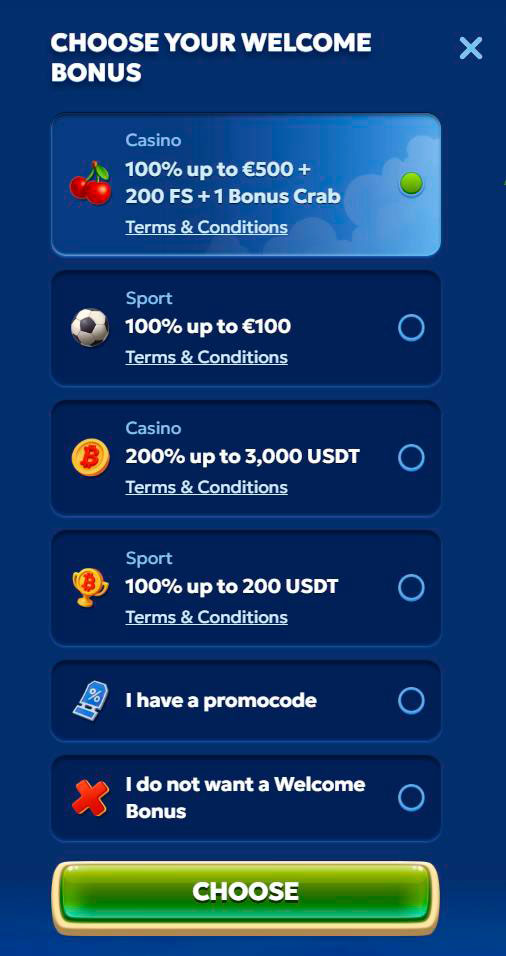
Bottom line, if you love slots and live casino, grab the casino welcome; if you are here mainly for football, tennis or basketball, the sports offer will fit you better.
Step 2 – Entering Your Personal Details
Now, once the welcome package is chosen, you move to the form where you enter your personal data and account credentials. You must provide true and complete information, because later we will verify it during KYC, and mismatches can block withdrawals.
- You will set your email, password, preferred currency and confirm you are at least 18 and not from an excluded country.
- The Pandido registration must be in your own name, and you cannot create accounts for other people, use fake identities or share details with others.
- You should keep your profile data updated if you move or change phone, since we may ask for proof of address or contact you about your account.
- Make sure your password is unique, not reused from other sites and kept strictly private to avoid unauthorised access.
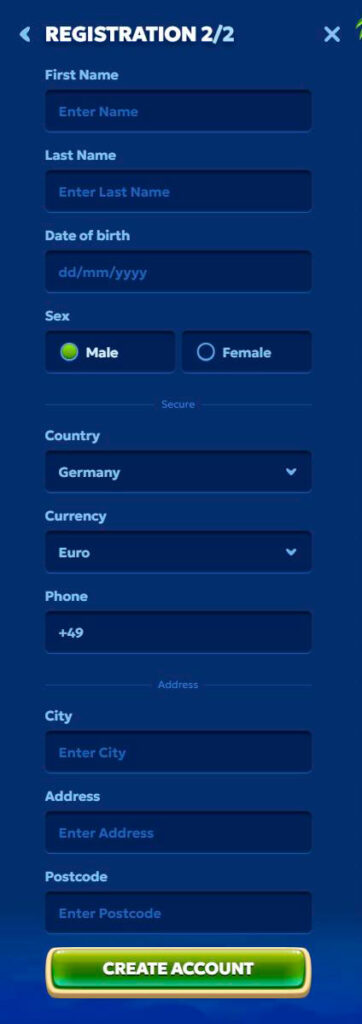
Honestly, filling everything correctly right away saves you a lot of time later when you want to verify your account and cash out your winnings.
Using a Promo Code During Registration
If you have a promo code from a partner site or campaign, you can usually enter it during the Pandido Casino sign-up or before your first qualifying deposit. You should always double-check the exact terms tied to that code, like minimum deposit in euros, maximum bonus amount and game restrictions in the bonus rules.
| Promo detail | Where to check |
| Min. deposit | Bonus or payments page |
| Max. bonus in € | Bonus description |
| Eligible games/markets | Bonus terms and conditions |
| Wagering requirements | General and promo rules |
Big plus, if your code is valid and correctly entered, the system will automatically link it to your account, so you can focus on using the extra funds instead of chasing support.
How to Log In to Pandido
You can log in to Pandido Casino from any modern browser using the Log in button at the top of the site, then enter the email and password that you used during registration. If you have cookies allowed, your login data can be remembered by the browser, so future sign-ins are even faster, but you should avoid this on shared devices.
Logging In on Desktop
Here is how it works on desktop: you open the Pandido site, click Log in in the header and fill in the short form that pops up. You type your email, your password, hit the Log in button, and you are instantly back to the lobby, sports, payments, VIP and other sections.
- Make sure nobody can see your screen or keystrokes when you enter your password, especially in public places.
- Never save your credentials on computers that you do not fully control, such as internet cafes, work devices or shared family PCs.
- If you stay inactive for a long time, you may be logged out for security reasons and will need to sign in again.
- If you see any suspicious activity, change your password immediately and contact support.
Bottom line, desktop login is straightforward, and once inside, you can switch between casino, live casino, jackpots and sports using the sidebar or header navigation.
Logging In via Mobile Shortcut (PWA)
Now, another standout feature is that you can create a shortcut on your phone that works almost like a mobile app, so you are always one tap away from Pandido. This shortcut behaves like a Progressive Web App (PWA), opening Pandido in a clean full-screen view directly from your home screen icon.
- On Android, you open Pandido in your browser, tap the three dots menu and select “Add to Home screen”, then confirm the shortcut name.
- On iOS, you tap the Share icon in Safari, scroll the menu and choose “Add to Home Screen”, then save the new Pandido icon.
- After creating the shortcut, you still use the same email and password to log in as on the desktop.
- The shortcut does not store your password by itself, so you can combine it with your browser’s own password manager if you want quicker access.
With the shortcut in place, you just tap the Pandido icon, sign in, and you are straight into slots, live tables or your sports bets without searching for the site every time.
Account Verification at Pandido (KYC)
To keep your money safe and follow regulations, we may need to verify your identity and payment methods with a standard KYC check. Pandido Casino verification can be requested either soon after registration or before withdrawals, and you will normally be guided through which documents to upload.
Documents and Information Required for Verification
Let’s be clear, KYC is not here to annoy you; it is here so we know we are paying the right person and not a fraudster. That is why we might ask for both identity and payment proofs tied specifically to the details you used when registering and depositing.
- A government-issued ID such as a passport, national ID card or driver’s licence, showing your full name and date of birth.
- Proof of address, such as a utility bill or bank statement, where your name and residential address match your profile.
- Proof of ownership and history of payment methods used, including card statements or screenshots for e-wallets and bank transfers.
- Any additional information needed to confirm the source of funds if required under responsible gaming or anti-money laundering rules.
Once your Pandido Casino verification is complete and everything matches, your withdrawals usually run smoother and future checks, if needed, are quicker.
Account Security After Verification
After KYC, you still need to protect your account from your side, because anyone who logs in with your correct credentials is treated as you. We secure the website with encryption and protected connections, but you must keep your password private and never give access to third parties.
| Security rule | What you should do |
| Password confidentiality | Never share with anyone |
| Unique account | Do not open duplicate accounts |
| Up-to-date details | Update email, phone, and address |
| Personal use only | Do not sell or transfer your account |
Big plus, by combining verified identity with good password hygiene, you significantly reduce the risk of someone hijacking your balance or playing in your name.
Password Recovery and Login Troubleshooting
If you forget your password, you do not need to create a new Pandido account; you just use the Forgot your password link on the login form. After entering your registered email, you will receive instructions to reset your password through a secure link, usually within a few minutes.
- Check your spam or promotions folder if the reset email does not show up in your main inbox.
- Make sure you enter the same email you used during registration, since other emails will not be recognised.
- Create a brand new, strong password that you do not use on other sites when you complete the reset.
- If the link expires or shows an error, initiate a fresh password reset request from the site.
If you still cannot log in after a successful reset, double-check for typos in your email, disable Caps Lock for the password field and try a different browser or device before contacting support.
Contact Support for Account Access Issues
Sometimes things just do not work, and that is when you should reach out to our support team so we can get you back into your account. You can access the Help Centre from the site footer or sidebar, where you will find contact options and articles about login or account issues.
- Use Live Chat if you want the fastest response about blocked accounts, login errors or verification status.
- Email support at the address listed in the Help Centre for more complex cases or when you need to attach documents.
- Be ready to confirm your personal data so the team can verify that they are talking to the actual account holder.
- Avoid sharing your full password with support, since we will never ask for it, even when resolving access issues.
Bottom line, if passwords, browsers and resets do not solve the login problem, talking directly to support is the quickest way to unlock your Pandido account.

Frequently Asked Questions
No, only one account per person, address, phone, email and IP is allowed.
You can normally deposit and play before full KYC, but we may require verification before withdrawals or if we detect anything unusual.
Change your password immediately and contact support so we can review the activity and secure your profile.
Yes, you always use the same email and password, whether you sign in on desktop, mobile browser or via the home screen shortcut.
If you do not accept our Terms and Conditions, you should not open an account or must close it and stop using our services.